
[toc]
はじめに
Windows 10にはDAC(Desktop App Converter)が提供されています。
デスクトップアプリをUWP(Universal Windows Platform)アプリに変換するツールです。
デスクトップアプリのUWP化に大いに寄与するツールなわけで、Windows 10に興味がある(わけではないのだが、仕事上必須である・・・)者としては、ぜひ試してみようと思った次第なのです。
マイクロソフトによる解説「Desktop to UWP Bridge: Desktop App Converter」があります。ここにDAC化の方法が書いてありまして、読みながら試してみることにしました。
DAC化するのは、自作のWindowsフォームアプリ「るとるのメモ帳(SimpleRMemo)」です。
というか、はじめからDACを試したくて、このアプリを作ったのでした。
↓続き読んでね。
環境
私の環境は以下のとおりです。
・MacBook Pro (Retina, 13-inch, Late 2013)
・macOS Sierra
・VMware Fusion Version 8.5.3
の上で、
・Windows 10 Professional Build 15063(Creators Update)
を使っています。
ちなみに、Insider Previewに参加中。Creators Updateが出たばっかなので、Slow Ringにしています。
DACシステム要件
「Desktop to UWP Bridge: Desktop App Converter」によると以下の通り。
・Windows 10 Anniversary Update (10.0.14393.0 以降) Pro または Enterprise エディション
→Professionalを持っているので問題なし。
・64 ビット (x64) プロセッサ
・ハードウェア支援による仮想化
・Second Level Address Translation (SLAT)
→こちらは2に書いたとおりの仮想環境でしたが、問題なく動きました。
事前準備とDACのインストール
私は既にWindows 10を「開発者モード」にしていたので特に変更は無し。
Visual Studio 2017も入れていました。
DACはWindowsストアからインストールします。ストアで検索すれば出てきます。
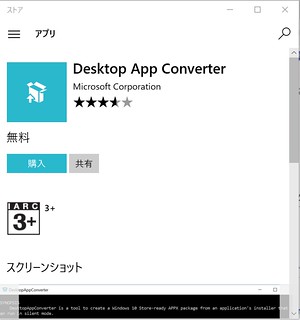
インストールが完了したらDACを管理者モードで起動します。右クリックで選んで起動ですね。
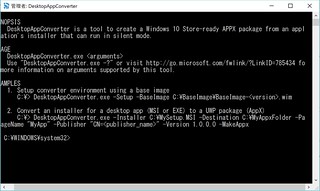
DAC実行
以下を実行。
今回は、シンプルにexeファイルからUWP化することにしました。Visual Studioで保存されるexeファイルをC:¥Installer¥MyAppにコピーしておきます。
[powershell]PS C:¥WINDOWS¥system32> DesktopAppConverter.exe -Installer C:¥Installer¥MyApp¥ -AppExecutable
SimpleRMemo.exe -Destination C:¥Output¥MyApp -PackageName "SimpleRMemo" -Publisher "CN=Rutoru"
-Version 0.0.0.1 -MakeAppx -Sign -Verbose[/powershell]
すると、以下のように色々と出力されて終了。
[powershell]
詳細: Log file can be found in
C:¥DesktopAppConverter¥946b9efe-a045-4cf4-9aa0-43a048a1a4fa¥logs¥DesktopAppConverter.log
詳細: Desktop App Converter
2.0.2.release_2017-04-20_15-32_d5d861e622cd5bd166242b726909575b22b31f27
詳細: ————————————————–
Checking Prerequisites
詳細: Checking Windows Version to ensure it meets minimum requirements
詳細: Minimum Windows Version requirement is met.
詳細: Checking if Microsoft Windows 10 SDK is installed
詳細: Checking Windows SDK version to ensure it meets minimum requirements.
詳細: The installed Windows SDK version 10.0.15063.137 is supported
詳細: Checking if MAKEAPPX.exe is available in the Microsoft Windows 10 SDK tools
詳細: Checking if SIGNTOOL.exe is available in the Microsoft Windows 10 SDK tools
詳細: Checking if MAKEPRI.exe is available in the Microsoft Windows 10 SDK tools
詳細: Ensuring the provided Installer (C:¥Installer¥MyApp¥) exists
詳細: ————————————————–
Validating inputs
詳細: Checking if Destination (C:¥Output¥MyApp¥SimpleRMemo) exists
詳細: C:¥Output¥MyApp¥SimpleRMemo does not exist. Creating it…
詳細: Ensuring that this script has write permissions to C:¥Output¥MyApp¥SimpleRMemo…
詳細: Ensuring that the provided AppExecutable ‘SimpleRMemo.exe’ is a ‘.exe’
詳細: Copying loose package files to C:¥Output¥MyApp¥SimpleRMemo¥PackageFiles
詳細: ————————————————–
Initializing AppxManifest.xml
詳細: Attempting to set appx manifest property ‘Package.Identity.Name’ to ‘SimpleRMemo’.
詳細: Attempting to set appx manifest property ‘Package.Identity.Publisher’ to ‘CN=Rutoru’.
詳細: Attempting to set appx manifest property ‘Package.Identity.Version’ to ‘0.0.0.1’.
詳細: No value provided for appx manifest property
‘Package.Properties.PublisherDisplayName’. Attempting to set it to the default value
‘Rutoru’
詳細: Attempting to set appx manifest property ‘Package.Properties.PublisherDisplayName’ to
‘Rutoru’.
詳細: No value provided for appx manifest property ‘Package.Properties.DisplayName’.
Attempting to set it to the default value ‘SimpleRMemo’
詳細: Attempting to set appx manifest property ‘Package.Properties.DisplayName’ to
‘SimpleRMemo’.
詳細: No value provided for appx manifest property
‘Package.Applications.Application.VisualElement.Description’. Attempting to set it to the
default value ‘SimpleRMemo’
詳細: Attempting to set appx manifest property
‘Package.Applications.Application.VisualElement.Description’ to ‘SimpleRMemo’.
詳細: No value provided for appx manifest property
‘Package.Applications.Application.VisualElement.DisplayName’. Attempting to set it to the
default value ‘SimpleRMemo’
詳細: Attempting to set appx manifest property
‘Package.Applications.Application.VisualElement.DisplayName’ to ‘SimpleRMemo’.
詳細: No value provided for appx manifest property ‘Package.Applications.Application.Id’.
Attempting to set it to the default value ‘SimpleRMemo’
詳細: Attempting to set appx manifest property ‘Package.Applications.Application.Id’ to
‘SimpleRMemo’.
警告: DesktopAppConverter : warning ‘W_ANYCPU_FORCING_64_BIT_APPLICATION’: Managed
executable ‘C:¥Output¥MyApp¥SimpleRMemo¥PackageFiles¥SimpleRMemo.exe’ can run as a 32-bit
or 64-bit application. Forcing 64-bit application package for converter compatibility. Use
the ‘-PackageArch x86’ command line parameter to create a 32-bit application package
instead.
詳細: Saving manifest…
詳細: ————————————————–
Processing application assets
詳細: Extracting icons from app executable file to use as application assets
詳細: Indexing Assets into resources.pri
詳細: Resource file creation complete.
詳細: ————————————————–
Making Final Appx Package
詳細: Appx creation complete. Find it at C:¥Output¥MyApp¥SimpleRMemo¥SimpleRMemo.appx
詳細: ————————————————–
Signing Appx Package
詳細: Appx Signing complete. Find it at C:¥Output¥MyApp¥SimpleRMemo¥SimpleRMemo.appx.
Install auto-generated certificate before deploying it
詳細: Conversion complete. Your converted application is located at
C:¥Output¥MyApp¥SimpleRMemo.
Warning Summary:
W_ANYCPU_FORCING_64_BIT_APPLICATION
Managed executable ‘C:¥Output¥MyApp¥SimpleRMemo¥PackageFiles¥SimpleRMemo.exe’ can run as a 32-bit or 64-bit application. Forcing 64-bit application package for converter compatibility. Use the ‘-PackageArch x86’ command line parameter to create a 32-bit application package instead.
Output Paths:
Name Value
—- —–
CertPath C:¥Output¥MyApp¥SimpleRMemo¥auto-generated.cer
PackageFilesPath C:¥Output¥MyApp¥SimpleRMemo¥PackageFiles
PackagePath C:¥Output¥MyApp¥SimpleRMemo¥SimpleRMemo.appx
LogFilesPath C:¥Output¥MyApp¥SimpleRMemo¥logs
[/powershell]
アプリの展開
[powershell]
PS C:\Output\MyApp\SimpleRMemo\PackageFiles> Add-AppxPackage -Register .\AppxManifest.xml
[/powershell]
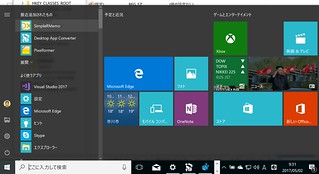
これでスタートメニューに登録されます。
以下の図の左上参照。
動作確認
起動も無事に成功。
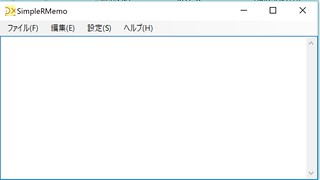
もともと、フォントやウィンドウの場所をレジストリに登録する作りだったので、フォームアプリとして起動すると、
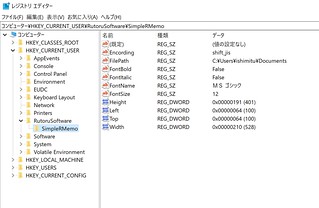
のように、レジストリに登録されたのですが、UWP化されると、
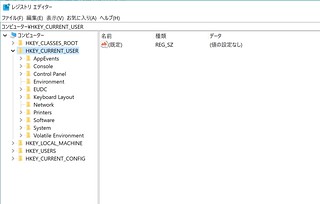
と、レジストリを汚すことはありませんでした。
最後に
「Desktop to UWP Bridge: Desktop App Converter」を読むと、未だ色々と問題があるようです。しかし、いずれWindowsアプリはすべてUWP化されるのではないか、と予感させるようなツールでありました。
UWPはサンドボックス化されていて、セキュリティ面でもいいわけでして、従来からのアプリのUWP化に寄与するツールであり、成熟に大いに期待します。
